
BDMP: Personal
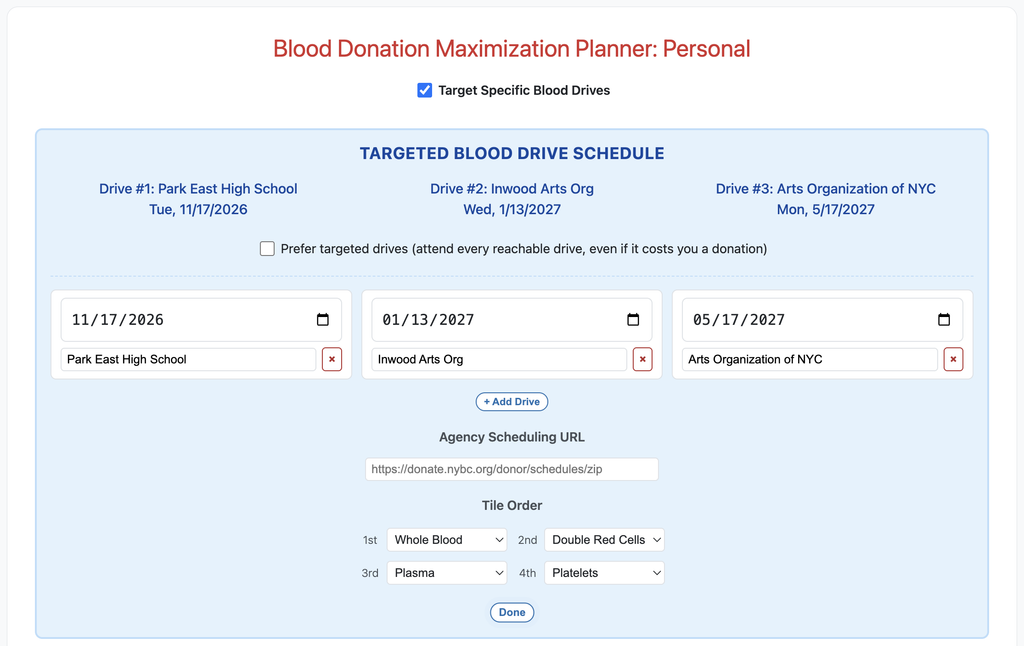
If you are using BDMP: Personal and would like to target favorite blood drives, check the Target Specific Blood Drives checkbox, then enter any target drives that you would like to hit. They will be saved on your device. Set your preferred Agency Scheduling URL, or accept the default NYBC if you’re in New York City.
Choose your Tile Order–and if you only ever donate whole blood and would prefer not to see others, set tiles 2-4 to “None”. If you rotate your donations through multiple types and would prefer to see the tiles in a different order, set that here.
When finished editing options, click Done to close settings. To make changes, click Drives & Settings to reopen.
BDMP: Org is designed for organizations to preconfigure their blood drives to make it easy for their constituents to sign up and plan interim donations between drives.
Shared Planner Functionality (Personal and Org)
Choose whether you Prefer Targeted Drives–that is, ensure that you donate at as many of your targeted drives as possible–or prefer to maximize your donations at the expense of missing one or more target drives.
If you are a first-time donor, check that box and the tool will calculate your upcoming donation windows immediately.
If you have donated before, enter your last donation type and date.
The BDMP will calculate your donation windows of opportunity ahead. The parenthetical day counts after each window are “I” (“Interval”), the number of days from the first (or only) date of the preceding item, and “W”, the number of “wiggle room” days, that is, how many days of flexibility you have to stay on track to meet your next donation target. You can borrow days from the next window’s wiggle room if life gets in the way (that is, donate later than this window’s closing date), but remember that such borrowing will shrink the subsequent window.
Every donation opportunity has an Add to Calendar button that will allow you to add a reminder either to Google Calendar directly, or you may choose to download an ICS file that you can open in your other preferred calendar app.
BDMP: Org
BDMP: Org is a page for Blood Drive Coordinators to create an account or log in if they already have done so.
For a new Org, fill out the form, then click Create Account. You may log in with the account you created immediately to add your blood drives, logo if you wish, set your preferred agency scheduling URL, and set up your Org’s direct planner link to send to your constituents.
The default behavior is that anyone with the link can view your planner, but it won’t appear in web search results; if you would like search engines to be able to index your planner so that it turns up in search results, you may choose to “Allow this Org Planner to be indexed” in Org Planner Settings.
If you would like to link your constituents directly to your drive for easy scheduling, add your direct drive scheduling link to the drive. If a link is present, a Schedule button will appear directly below that drive until 5:00pm on the date of the drive, after which it will disappear.
When you mark setup complete and save changes, the site admin will be notified to review and publish your link. (This is a basic restriction to prevent abuse.)
If you are civic-minded and would like to maximize your own or your organization’s impact, I hope you find this tool useful. If I can boost blood donations by making it easier for donors to plan, I will count it as a civic win!
Abe Hendin